


DODO - Live Video Chat
4.3803.00 Reviews
App Specs
- Version
- 1.0.148
- Updated On
- License
- Free
- Downloads
- 10,000,000+
- Developer
- Xiani Software Limited
- Categories
- Social
- Platform
- Android
Screenshots
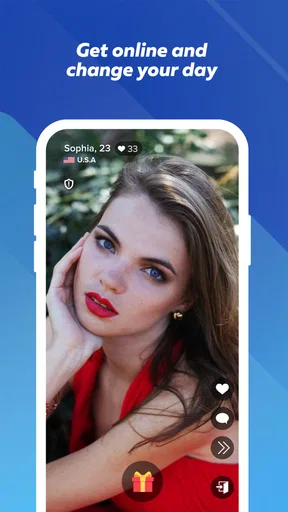
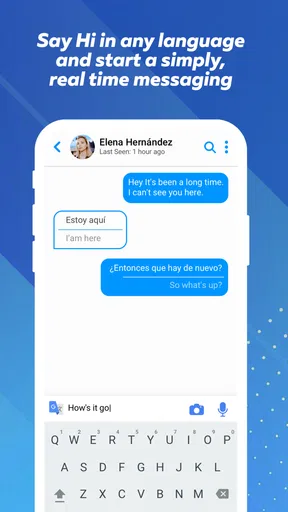




 Analysis by AppCompare
Video chat can feel effortless when the connection is good and surprisingly demanding when it is not. I found that this is the main lens through which to judge DODO - Live Video Chat: it is built around meeting interesting people through live video, so the quality of the experience depends not only on the app itself but also on the moment, the network, the amount of data available, and how comfortable you are speaking with strangers. That makes it more immediate than a normal social feed, but also less predictable.
DODO is a free social app from Xiani Software Limited, aimed at mature users and available for devices running Android 8.0 or later. Its current version is 1.0.148, and the app has reached over 10 million installs. Those figures suggest that it has found a substantial audience, while its average rating of 4.3 from around 32 thousand ratings indicates that many users find the basic idea worthwhile. My own view is more specific: it can be enjoyable when I want spontaneous conversation, but it is not the right replacement for a messaging app, a carefully moderated community, or a dependable way to contact people I already know.
How DODO feels when the connection is doing the work
The first thing I notice in a live video chat app is how quickly the interaction starts to feel real. Text leaves room to pause, edit, and interpret. Video does not offer the same distance. A glance, a delay, or a sudden change in image quality becomes part of the conversation. DODO’s appeal comes from that immediacy: instead of building a profile slowly or waiting for a reply, I can enter a more direct social setting and see whether a conversation has any natural energy.
That immediacy is also why network conditions matter so much. On a strong connection, the experience feels active and responsive. I can concentrate on the person rather than on whether the picture is catching up with the sound. In a weak or busy connection, the social side becomes harder because every pause raises a question: is the other person thinking, has the call stalled, or is the app still transmitting? Even a short interruption can make an unfamiliar conversation feel awkward.
I would use DODO when I have a stable connection and enough time to give a conversation my attention. It works less well as something to open casually while walking, commuting, or switching between tasks. Live video asks for more focus than scrolling through posts, and the app’s central idea leaves little room for a completely passive session.
There is a useful trade-off here. The less structured nature of live social discovery can produce conversations that feel more spontaneous than carefully arranged chats. At the same time, spontaneity means I cannot expect every interaction to be interesting, comfortable, or equally easy to follow. I see DODO as a tool for opening a social moment, not as a guarantee that the moment will be rewarding.
Why mobile surroundings change the experience
Although this is a mobile app, not every mobile situation is suitable for it. A quiet room with a reliable connection gives me a much better chance of enjoying video chat than a crowded café, a moving vehicle, or a place where I need to keep checking what is happening around me. The phone may make access convenient, but convenience should not be confused with privacy or concentration.
Worth Reading Before You Choose

EA SPORTS FC Mobile 26 Is a Bigger Football Game, but It Takes Time

Flipboard Shows What News Apps Must Do Beyond the Feed

Switching to Android Auto Means Rethinking Your Driving Routine

Google Calendar Makes a Crowded Week Easier to Manage

Ludo King Makes the Most of the Minutes Between Plans

Baby Panda World Brings Quick Play to Modern Phones, but Its Game Library Feels Busy
A realistic everyday use case would be opening DODO at home after work, when I have a little free time and want a conversation that feels less predictable than browsing a familiar social network. I can put the phone somewhere steady, use a connection I trust, and treat the session as a deliberate social activity. That setup is very different from trying to chat while carrying shopping bags or standing in a noisy station. In the second situation, audio and attention can both become problems even if the app itself is working normally.
I also think about battery and mobile data before starting a longer session. Video is more demanding than text, so I would avoid beginning a conversation when the phone is already low on power or when my data allowance is nearly exhausted. This is not a criticism unique to DODO; it is part of the cost of choosing live video over lightweight messaging. Still, it affects whether the app fits into a person’s routine.
The mature 17+ rating is important in deciding where and how to use it. I would not treat DODO as a family-oriented social space or hand it to a younger user simply because the download itself is free. Adults should approach conversations with normal online caution, especially when the interaction involves people they do not know. A live face can make someone seem familiar quickly, but familiarity on screen is not the same as trust.
What to do when a session becomes unreliable
One practical weakness of any live video service is that failure is visible. A frozen image, delayed sound, or dropped interaction can interrupt the mood immediately. When that happens, I find it useful to separate technical trouble from a poor social match. If several conversations fail in a row, the connection or surroundings may be the real issue. If the video is clear but the exchange feels uncomfortable, changing the person or ending the interaction is the more sensible response.
My recovery routine would be simple: stop moving, check whether the phone has a stable connection, close other demanding activity, and try again from a quieter position. I would not keep tapping repeatedly or assume that every delay means the other person is ignoring me. A short pause can come from the network rather than from the conversation. That small change in mindset prevents unnecessary frustration.
It is also worth deciding in advance how much interruption I am willing to tolerate. If a conversation is promising, one retry may be worthwhile. If the interaction is already uncomfortable, a connection problem can be a natural reason to leave rather than a problem to solve. DODO is at its best when I remain in control of that choice instead of feeling obliged to rescue every session.
Users who need dependable communication should choose a different kind of app. If I am arranging a meeting, speaking with family, or handling something important, I would prefer a service designed for known contacts and predictable calls. DODO’s social discovery angle is better suited to low-stakes exploration. That distinction is one of the most important things to understand before downloading it.
Using DODO without wasting mobile data
Because live video can consume more resources than ordinary social browsing, I would make DODO part of a data-conscious routine. I would use a trusted Wi-Fi connection for longer sessions when possible, avoid leaving a video chat running while distracted, and pay attention to how quickly the phone’s battery and data balance change. The free download does not mean that every part of using the app is cost-free; the network connection and optional purchases still matter.
The app includes in-app purchases ranging from $0.99 to $274.99 per item. That is a wide range, so I would be especially careful before confirming anything inside the app. I would treat paid options as optional rather than necessary for deciding whether the basic social experience suits me. A sensible approach is to use the free entry point first, understand the conversation flow, and only then decide whether any purchase has a clear personal benefit.
This is also where DODO differs from ordinary social networks. A feed lets me consume small pieces of content at my own pace, often with fewer consequences when I pause. Live video creates a continuous exchange, so time, attention, data, and emotional energy are all being spent at once. I would not open it with the same expectations I have for a photo-sharing app or a text-based community.
There is a less obvious advantage to being deliberate about data: it can improve the social experience itself. When I am not worrying about a weak signal or a nearly exhausted allowance, I can listen properly and make better decisions about whether a conversation is worth continuing. In other words, connection planning is not only a technical precaution; it helps me stay present.
How it compares with familiar social alternatives
Compared with messaging apps, DODO offers more immediacy but less predictability. Messaging is usually better when I already know who I want to contact, need to send information, or want time to think before replying. DODO makes more sense when the point is meeting someone new through live interaction rather than maintaining an existing relationship.
Compared with large social networks, it places more weight on direct conversation and less on passive browsing. That can feel refreshing if I am tired of endless feeds, but it can also feel demanding because I cannot hide behind quick reactions or short comments as easily. The app asks me to participate in the social moment instead of simply observing one.
Compared with dedicated video meeting tools, DODO is not the option I would choose for work, study, appointments, or organized group communication. Those services are usually selected for known participants and a clear purpose. DODO’s strength is the possibility of an informal, unexpected exchange. Its weakness is the same thing: the result depends heavily on who is available and how the interaction develops.
That makes the app particularly suitable for adults who enjoy spontaneous conversation and are comfortable setting boundaries quickly. It is less suitable for anyone who wants a curated community, a quiet browsing experience, or strong predictability from every session. If I dislike talking to unfamiliar people on camera, the central feature is likely to feel like pressure rather than entertainment.
Small habits that make the app easier to judge
I would not evaluate DODO after one rushed attempt in a poor signal area. I would try it in a controlled setting, with enough time to understand whether the conversations feel natural and whether the connection remains usable. This is a more useful test than judging it solely by the first person who appears or by one interrupted session.
I would also keep the first sessions short and purposeful. Rather than treating every available interaction as something I must continue, I would use the opening moments to decide whether the conversation is respectful, understandable, and worth my attention. That habit reduces wasted data and makes it easier to leave without feeling that I have lost anything.
Another practical tip is to protect the physical setup. A stable place for the phone is better than holding it at an awkward angle, and a quiet environment makes a greater difference than many new users expect. These choices do not add features to DODO, but they remove avoidable friction from an experience that already depends on real-time communication.
Finally, I would keep personal boundaries clear. I would avoid sharing sensitive details simply because a conversation feels friendly, and I would end an interaction that becomes uncomfortable. The mature rating signals that this is an adult social environment, not that every exchange will automatically be suitable or trustworthy. Good judgment remains part of using the app.
Who should download it, and who should skip it
I can recommend DODO to adults who want a free way to explore live social conversations, have a reliable connection, and understand that the experience will vary from one interaction to the next. Its large install base and 4.3 average show that the concept has broad appeal, but those figures do not remove the need to decide whether spontaneous video suits a particular personality.
I would suggest skipping it if the main goal is contacting friends, organizing work, conserving mobile data, or finding a tightly moderated interest group. A conventional messenger, a private video service, or a focused community app will usually be a better match in those cases. DODO is not a universal social replacement; it is a more specific choice for live discovery.
I would also be cautious about using it in places where privacy is limited. A public setting can make it difficult to speak freely, while background noise can damage a conversation before either person has a fair chance. Waiting until the environment is appropriate is often more effective than blaming the app for a poor mobile moment.
My connectivity verdict
DODO - Live Video Chat succeeds when I approach it as an on-demand social encounter rather than as a standard messaging tool. Its strongest quality is immediacy: video can turn an unknown person into a real conversation far faster than a feed or a comment thread. Its biggest limitation is that the same immediacy exposes every weakness in the connection, surroundings, attention span, and social match.
The app is free to start, supports Android 8.0 and later, and comes from Xiani Software Limited. Its 17+ rating and optional purchases mean I would use it with adult awareness rather than casual assumptions. I like the idea for relaxed, low-stakes exploration, especially when I am settled somewhere with a dependable connection. I would not rely on it for important communication or recommend it to someone who wants a predictable, private, or carefully organized social experience.
My recommendation is conditional but positive: try it when you genuinely want live conversation, protect your data and attention, and judge the app over several sensible sessions rather than one unlucky connection. If that style of interaction feels energizing, DODO can add a more direct social option to a phone. If the uncertainty feels tiring, a familiar messaging or video-call alternative will probably serve you better.
Pros
- Quickly connects you with people for spontaneous video conversations.
- Simple interface makes starting a live chat easy for new users.
- Interactive features help keep conversations engaging and lively.
- Useful for meeting people from different countries and backgrounds.
- Works well for short
- casual chats when you have limited time.
Cons
- Conversations can vary greatly in quality and user behavior.
- Some features or interactions may require in-app purchases.
- Live video chat can consume significant mobile data and battery.
- You may encounter language barriers during international conversations.
- Privacy settings should be reviewed carefully before sharing personal details.
FAQs for DODO - Live Video Chat
What is DODO - Live Video Chat, and how does it work?
DODO - Live Video Chat is a social communication app designed for meeting people through live video conversations. After creating a profile, you can browse available users, start chats, and interact in real time, depending on the features offered in your region. The experience is centered on spontaneous conversations, so a stable internet connection, a working camera, and microphone access are important for smooth calls.
Is DODO - Live Video Chat free to download and use?
The app may be free to download, but some communication features, virtual items, premium options, or extended interactions can require in-app purchases. Before using paid features, check the current pricing shown in the app and review whether subscriptions renew automatically. Availability and costs may vary by country, device, account status, and promotional offers, so users should confirm the final price through Google Play or the App Store.
Does DODO require a camera, microphone, or location permissions?
Because DODO focuses on live video communication, camera and microphone permissions are normally needed for video calls and voice conversations. The app may also request notifications, storage, contacts, or location access depending on the version and features you use. You can deny optional permissions and manage them later in your device settings, although restricting essential permissions may prevent certain functions from working correctly.
Is DODO - Live Video Chat safe for meeting strangers online?
As with any app that connects you with unknown people, users should be careful and avoid sharing private information such as their address, phone number, passwords, financial details, or personal documents. Use the app’s blocking and reporting tools when available, end conversations that feel uncomfortable, and be cautious of requests for money or external contact. Parents should also supervise younger users and review the app’s age rating.
What should I do if I experience inappropriate behavior, technical problems, or unwanted charges?
If another user behaves abusively, sends inappropriate content, or pressures you, stop communicating and use the in-app report or block options if available. For camera, microphone, login, or connection issues, update the app, check permissions, restart your connection, and try again. If you notice an unexpected purchase, review your Google Play or App Store receipt and contact the relevant store or DODO support promptly.


